
Appearance
New session
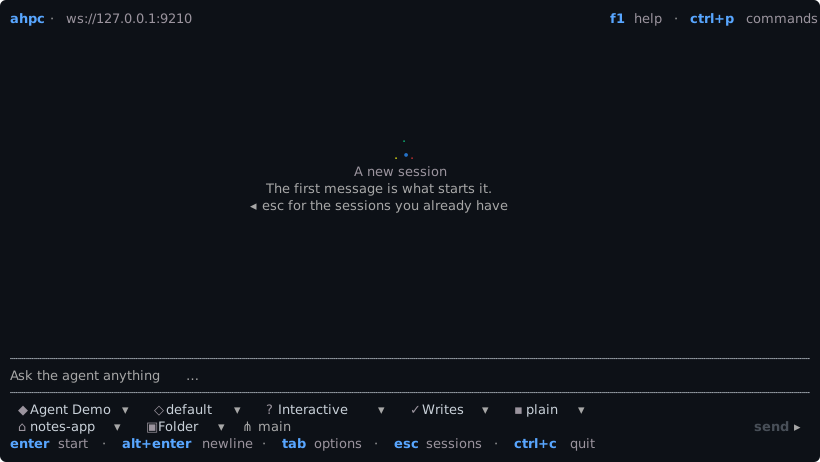
ahpc opens on a new session, and ctrl+n opens one from anywhere.
The first message starts the session, and the screen becomes the session.
The agent
The host serves the agents, which the protocol calls harnesses. The first chip picks one, such as Claude or Copilot. Each host has its own list. See Agents.
The fields
Below the composer, each chip is a field the host sends. The agent and the host each send their own, so the fields change with the host and with the agent you pick. ahpc draws a chip for a field it does not know too.
The usual fields:
| Field | In the picture | |
|---|---|---|
| Agent | Agent Demo | Which agent runs the session |
| Model | default | The model the next message runs on |
| Mode | Interactive | How the agent works: step by step, plan first, or on its own |
| Permissions | Writes | Which tools wait for your approval |
| Folder | notes-app | The workspace on the host |
| Isolation | Folder | Work in the folder itself, or in a new worktree beside it. Only for a git repository |
| Branch | main | The branch to work from. Only for a git repository |
plain in the picture is a field of the demo agent's own. Another host may send fewer fields, or others.
The folder chip opens a folder dialog over the host's own directories. Workspace path in the palette takes a typed path instead.
Keys
| Key | |
|---|---|
enter | Send |
alt+enter | Newline |
tab | Move through the field rows |
/ | Slash commands, from the host and from ahpc. See Customizations |
@ | Complete a file path on the host |
ctrl+g | Edit the message in $VISUAL or $EDITOR |
esc | Close the menu, leave the field, then go to the session list |
The composer takes the editing keys too.