
Appearance
Session
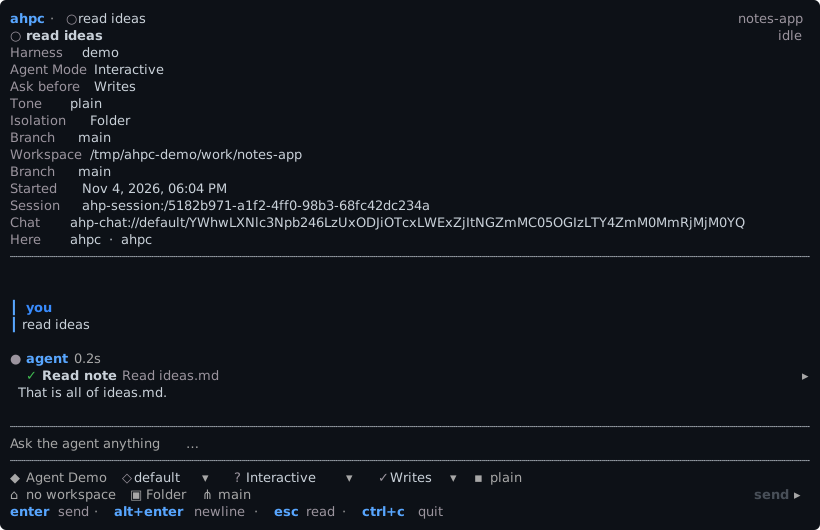
A session shows its transcript, and the composer for the next message.
The header shows the model, thinking level, permission mode, workspace and branch, as the host reports them.
ctrl+f finds text in the conversation. enter or down goes to the next match, up to the one before.
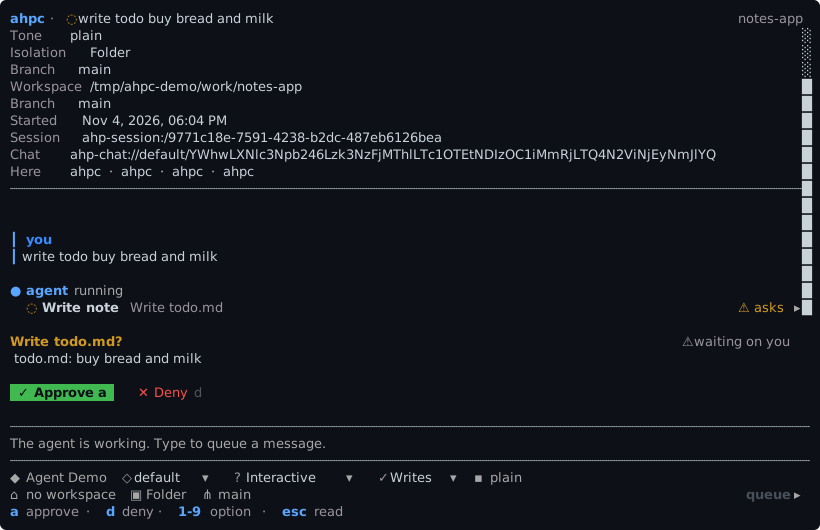
When a tool call is waiting, a approves it, d denies it, and 1 to 9 pick an offered option. When the agent asks a question, tab moves between fields, space selects and enter sends. See Turns.
The composer has the keys of a new session. While a turn runs, enter queues the message.
Its screens
The composer takes letters as text. esc leaves the composer, and then one key opens each screen of the session:
| Key | Screen |
|---|---|
c | Changes |
f | Files |
k | Skills and commands |
p | MCP servers |
u | Usage |
s | Session settings |
t | Stop the turn |
m | Markdown on or off |
l | Follow an agent-host-session:// link in the conversation |
Editing a message
Editing in the composer follows readline:
| Key | |
|---|---|
ctrl+a / ctrl+e | Start or end of the line |
ctrl+k / ctrl+u | Delete to the end, or to the start |
ctrl+w, alt+backspace | Delete the word before the caret |
alt+d | Delete the word after it |
ctrl+z / alt+z | Undo, redo |
ctrl+← / ctrl+→ | Move a word at a time |
Undo takes back a word, not a character.